





Key Takeaways
-
Nano Banana 2 in invideo is a fast, production‑grade image model that excels at accurate on‑image text, real‑world grounding, and subject consistency.
-
Best Nano Banana 2 prompts clearly specify: the asset type (ad, infographic, storyboard, UGC, comic), the subject and audience, the style and framing, any text that should appear, and the aspect ratio.
-
The below Nano Banana 2 prompts cover architectural diagrams, infographics, text fidelity, localization, macro detail, clarity and density, cinematic action, UGC, and comics.
-
Nano banana image editing prompts you can reuse across multiple projects.
Nano Banana 2 is built into the AI Image Generator. That means you can stop treating it like just another tool and start using it as a fast art director for real work. Ads, explainers, thumbnails, UGC frames, and storyboards, it does it all.
Nano Banana 2 Prompting Tips: The difference between generic AI art and a usable asset.
Nano banana 2 is only as good as your brief. Short, specific prompts beat long, vague ones every time.
Think of every nano banana 2 image editing request as a small creative brief.
In one or two sentences, tell the model what you’re making (for example, a 16:9 comic strip or 4:5 infographic), what it’s about, what the mood should be, what exact text should appear, and which aspect ratio you need.
For example, instead of:
Try:


The generic prompt is likely to create an image that’s has no visual hierarchy while a specific prompt increases the probability of generating an asset that is ready to be used in marketing campaigns.
How to Write a Prompt for Nano Banana 2?
When you write a nano banana 2 prompt, just tick off a few basics:
-
Subject and context: What is this about?
-
Style and mood: is the feeling educational, aspirational, intense, messy, playful?
-
Camera and composition: 16:9, 4:5 or 9:16?
-
On-image text: Exact wording and language for signs, shop boards, quotes, banners.
-
Short sentences: You can even use short sentences in your prompts for particular details you’d want to add.
-
Aspect ratio and resolution: Always mention AR; ask for “high resolution” or “4K” where needed.
-
Grounding: When you care about real-world details, guide Nano Banana AI with precise facts in the prompt.
A simple skeleton you can adapt for many of the best prompts for nano banana (and also for the best prompts for nano banana pro) is:
Best Nano Banana 2 Prompts
Below are some of the strongest nano banana 2 prompts we’ve tested across different use cases like infographics, localization, UGC, comics, and cinematic shots.
You can use these prompts directly with nano banana 2 in invideo natively and adapt the subject, brand, or details to fit your own projects.
1. Architectural Diagrams
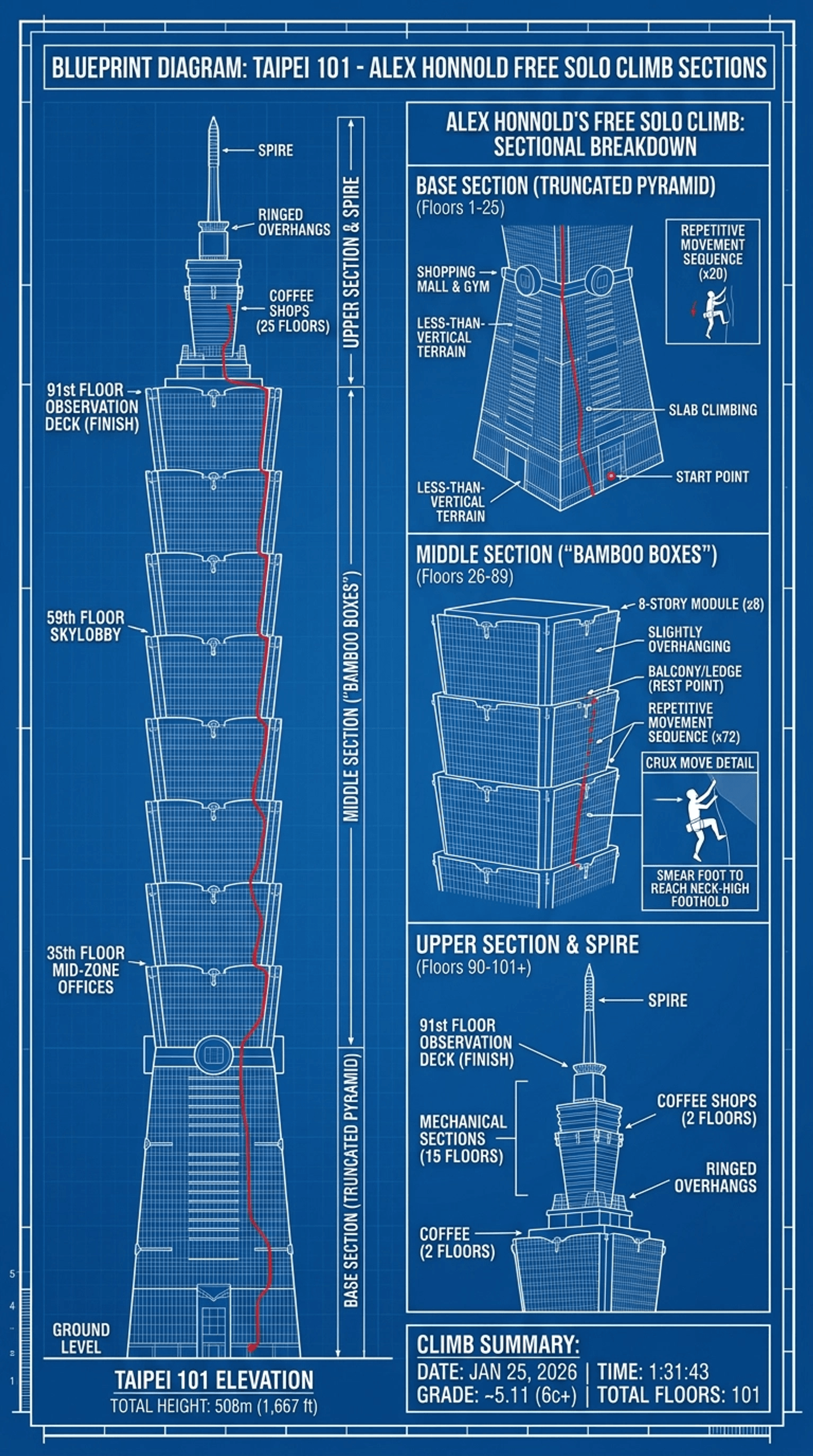
When you’re prompting for architecture, treat it like a mix of blueprint and story. Tell the model what the structure is, what kind of diagram you want, and what the diagram should explain or highlight. If there’s a path or sequence like we do in our prompt, make that explicit so it knows how to organise the building.
Here this prompt combines architectural structure with a storytelling angle, turning a skyscraper into a visual “map” of Alex Hannold’s real climb.
2. Branding and Timeline Infographics
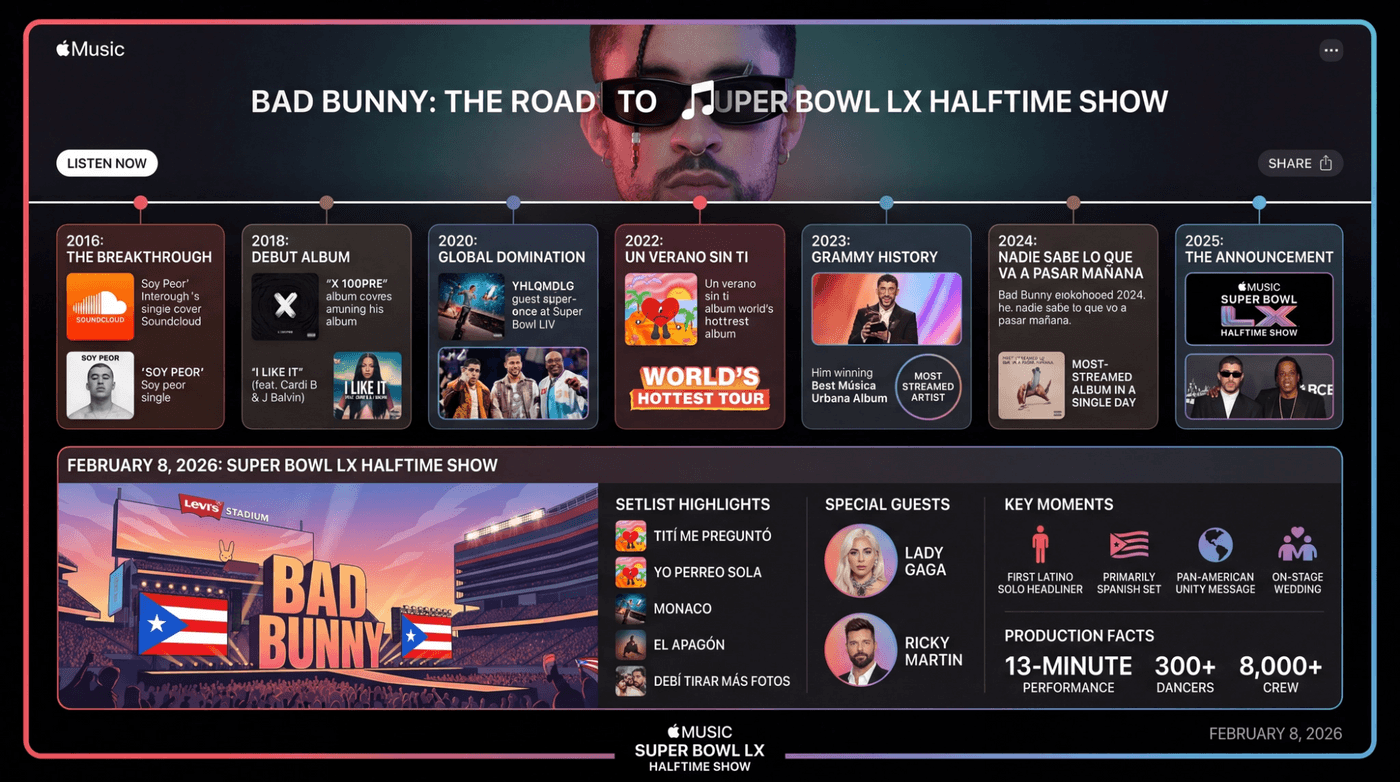
For timeline-style infographics, you want three things in the prompt: a clear subject, a specific end point in time, and the brand style you want it to mimic. That’s usually enough for the model to understand “this is a journey over time with a clear end date”.
This one shows how Nano Banana 2 can mix up‑to‑date information with a recognisable brand style. All from a short two-sentence prompt.
3. Infographics With Time‑Specific Data
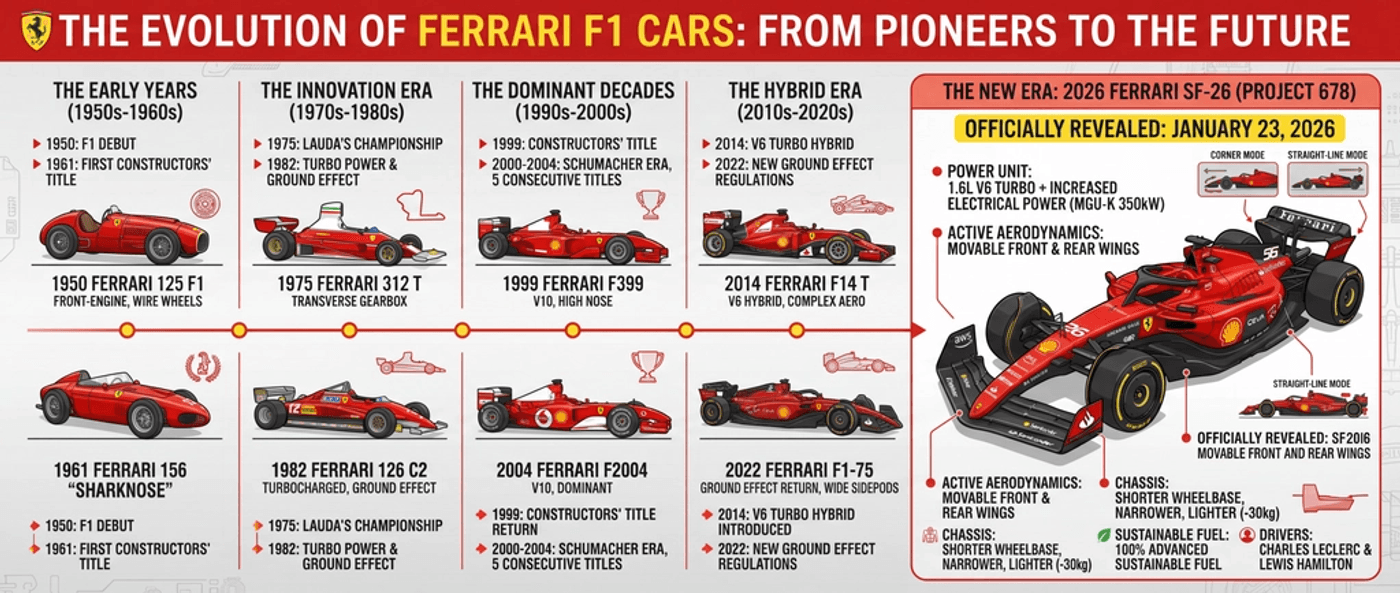
When you care about real‑world, time‑specific data, be concrete. Name the subject, ask for a progression “from old to latest,” and include full model names and dates. That signals you want a chronological, grounded infographic, not just generic icons.
Here, we have a grounded, data‑driven infographic brief that walks through the evolution of Ferrari’s F1 cars up to a specific 2026 model.
4. Text Fidelity
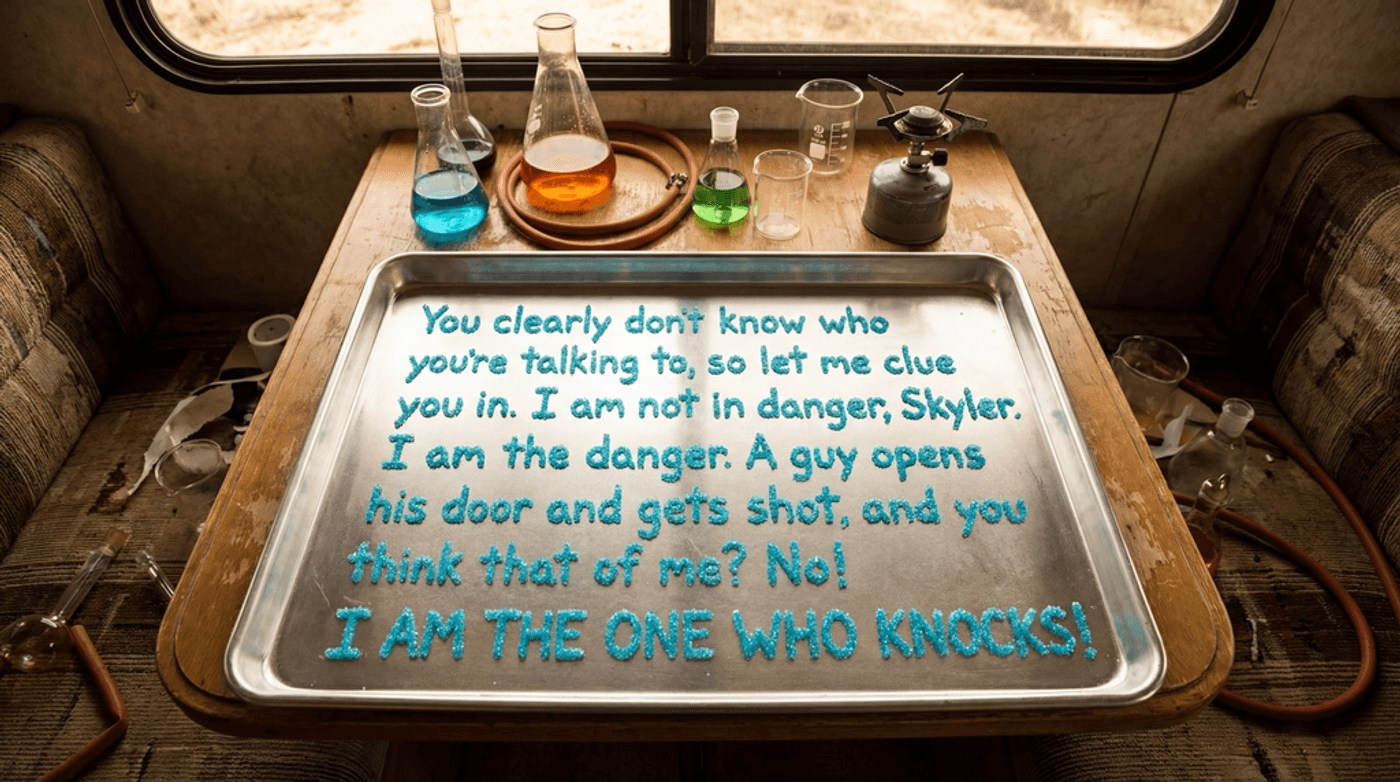
When you have a long copy, small objects, or a very specific quote, text fidelity becomes the most important thing. Put the exact wording in quotes, define the material forming the letters, and lock the camera angle and scene so the model treats the whole image as one big piece of typography.
Then we stress‑test it with something intentionally hard: a long, famous quote laid out in tiny sugar crystals, inside a specific environment. If the model can handle this, it will have an easier time with headlines, CTAs, and product labels.
5. Localisation and Multi‑Lingual Consistency
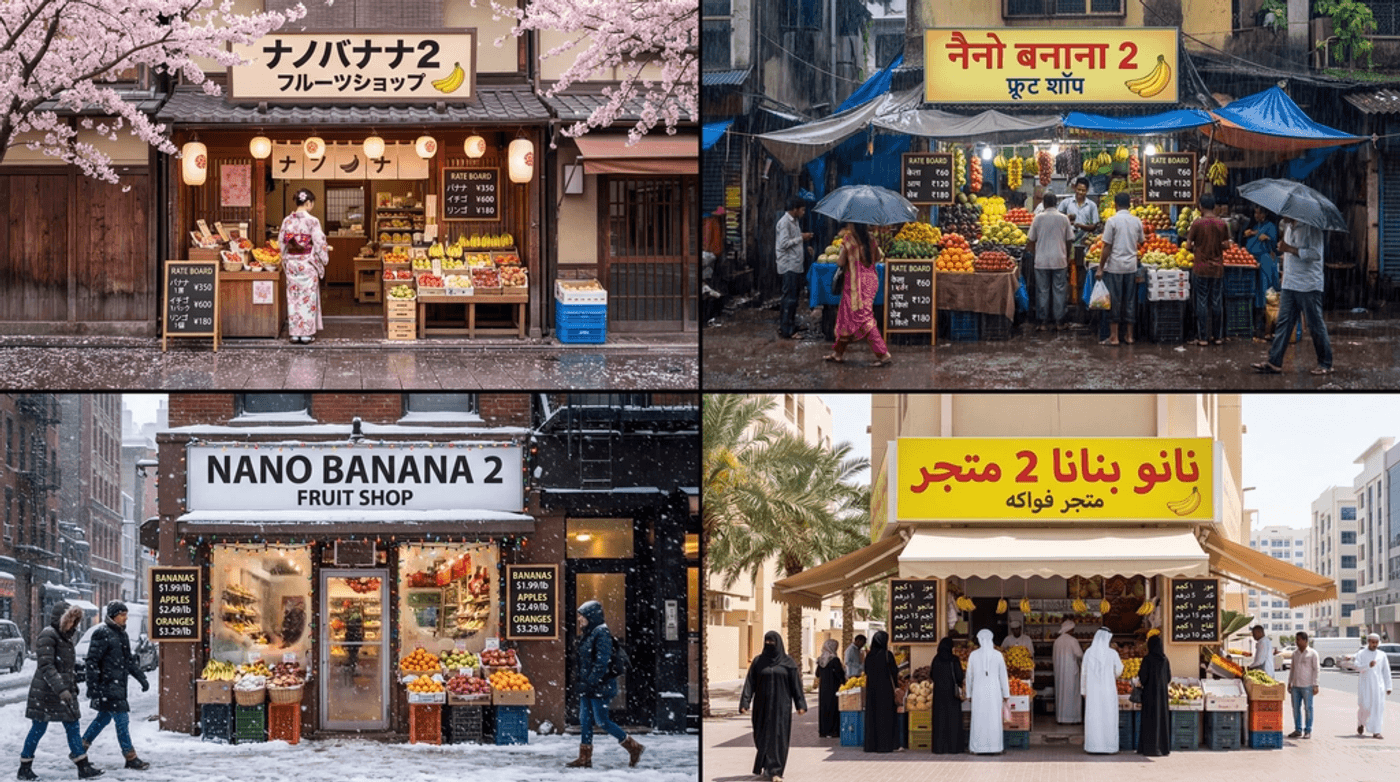
For localisation, the trick is to keep composition constant while city, language, and cultural details change. Tell the model how many versions you need, what must stay identical (camera, framing, store layout), and then list each city with its language and season so it can “reskin” the same shot for each market.
This localisation prompt keeps shot composition identical while swapping city, season, and language. Ideal for multi‑market creative systems.
Locations and seasonal context:
Kyoto in Spring — signage in Japanese
Mumbai in Monsoon — signage in Hindi
NYC in Winter — signage in English
Dubai in Summer — signage in Arabic
6. Macro HD Lens Simulation
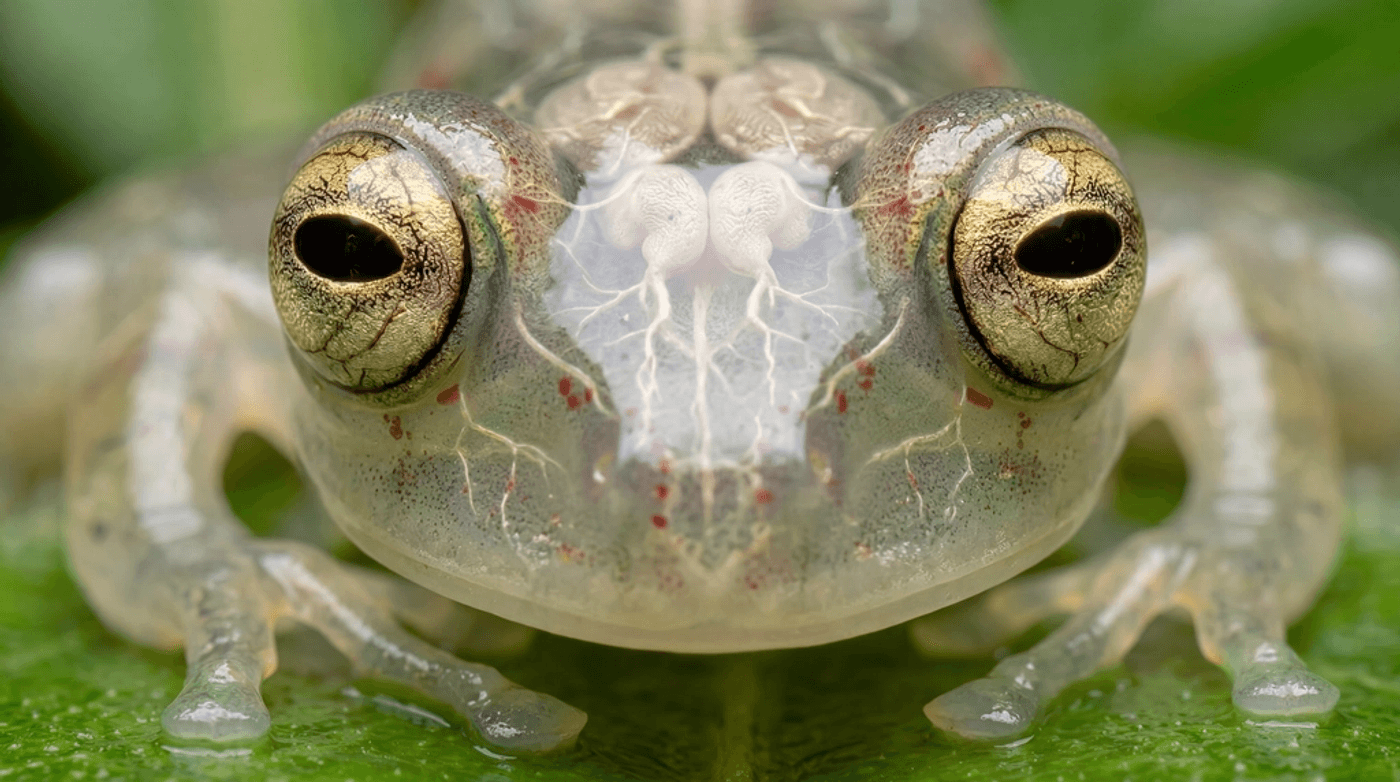
Macro prompts work best when you think like a specialist photographer. Be explicit about “ultra macro” or “extreme close‑up,” the exact part of the subject you care about, the lens setup, and the surface or background. That tells the model you care about optics and micro‑detail.
This is a pure image‑quality and lens‑control test: ultra macro, translucent subject, explicit lens mentions. It’s a very strong nano banana 2 prompt for photographers or anyone exploring image editing at microscopic scales.
7. Clarity and High Detail in Dense Scenes
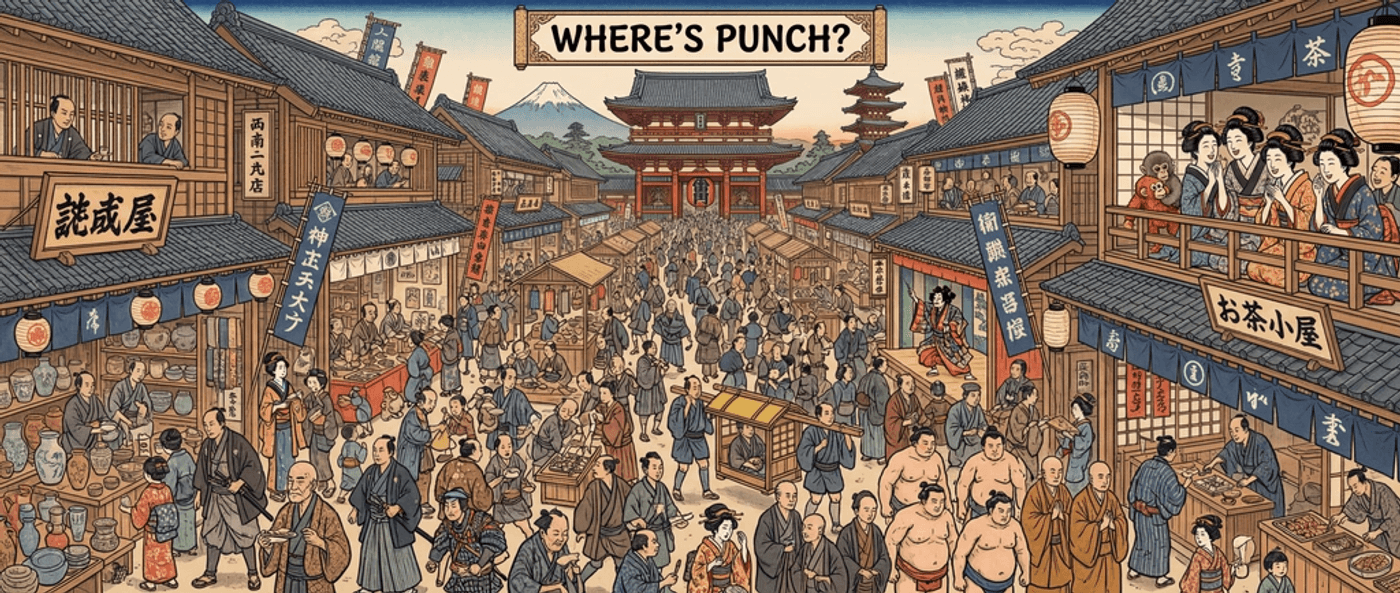
If you want dense scenes, you have to ask for both clutter and a clear hero. Reference the pattern (“Where’s Waldo”), define the era and setting, and define the hero.
Here, we’re pushing for scene density and clarity.
This is a nano banana 2 prompt example that shows how well the model handles cluttered, detailed scenes without losing the main subject.
8. Cinematic Action
For cinematic shots, you can treat the model like a full crew: give it a real person, real place and date, specific wardrobe, lighting, camera settings, and color palette. The more you lock in, the closer it behaves to a production still from a live shoot.
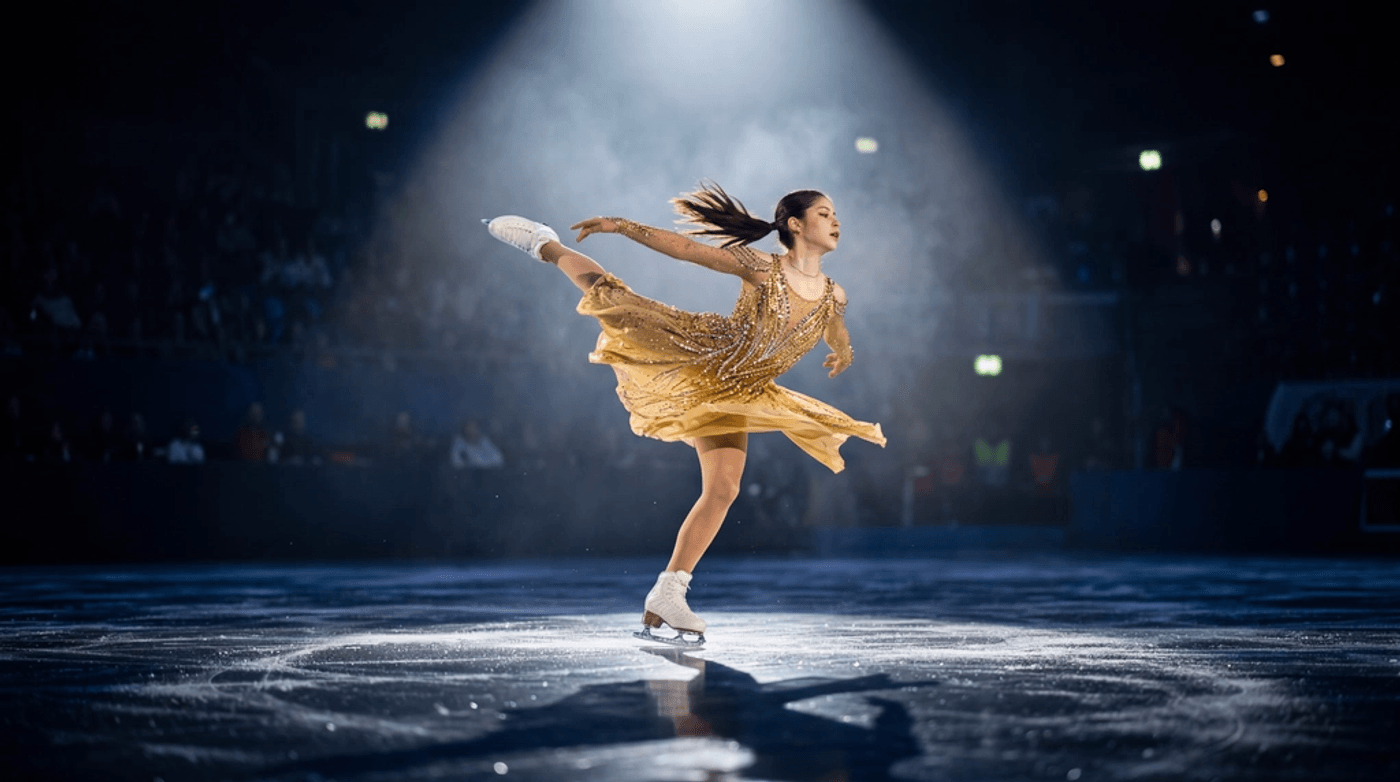
This is one of the most detailed prompts in the library and a great reference if you’re looking for prompts in a cinematic context. It controls pose, lighting, wardrobe, camera, shutter, and color palette.
Alysa is wearing a shimmering dress that “drips in gold” , sparkling under an intense overhead spotlight . The dress flows dynamically as she spins, emphasizing motion and a luxurious golden hue .
Use dramatic lighting with a focused spotlight from above creating a soft halo around her while the background remains dark with faint stars or light smoke for an ethereal atmosphere.
The ice surface reflects her figure to create depth and texture. Her expression should show focus and elegance during the complex movement.
Use a fast shutter speed (~1/1000s) to freeze the motion. Keep her body and dress sharp while allowing slight motion blur on the skirt and limbs to emphasize speed.
Color palette: rich gold tones contrasted with cool blues and whites from the ice and lighting to enhance elegance and visual drama.
9. Social Media UGC
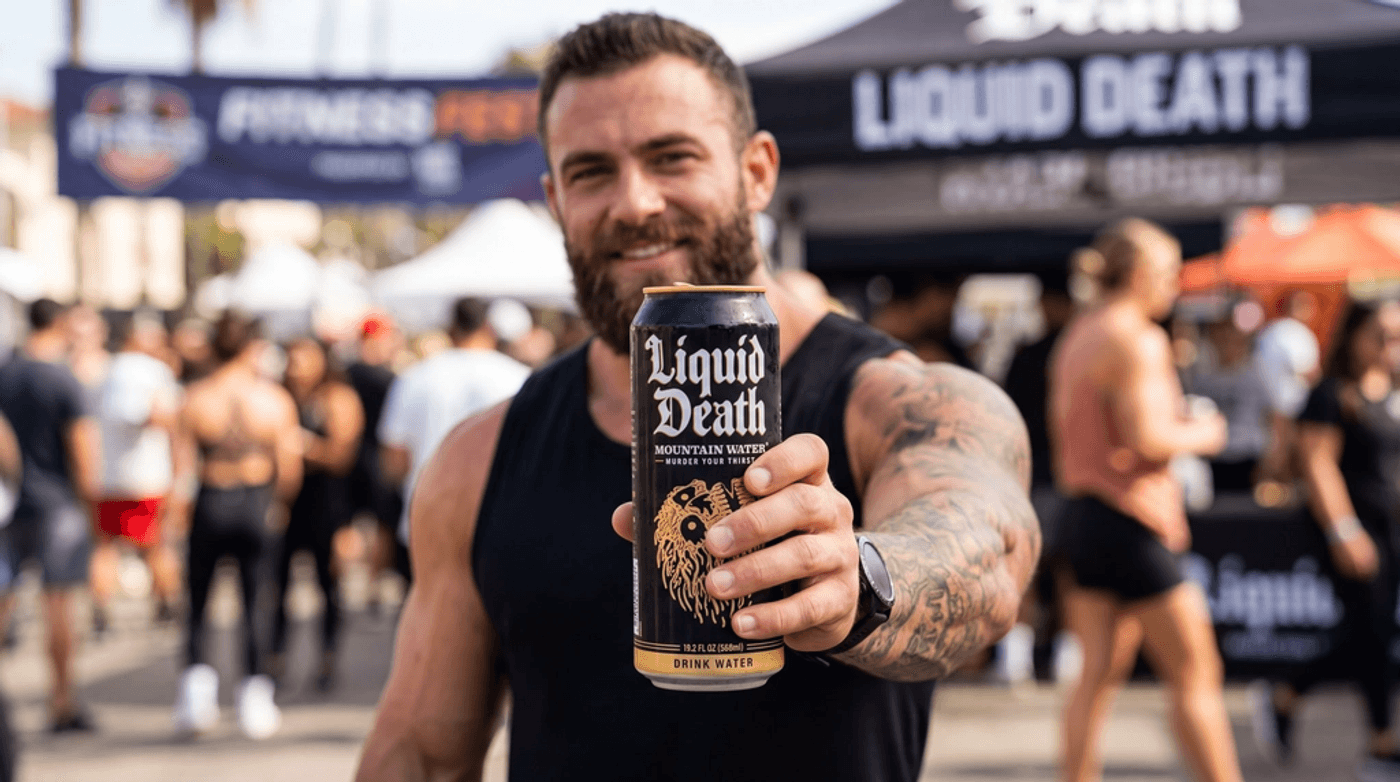
For UGC‑style brand shots, think like a social media manager. Define the creator (age, vibe), specify how dominant the product should be in the frame, and be clear that the brand text must stay readable and accurate. Ratios like “occupies 80% of the frame” make the model prioritise what matters.
This prompt shows how to use nano banana 2 for UGC‑style brand shots where text fidelity on the product and framing matter more than flashy effects.
The can occupies about 80% of the frame and is the main focus of the shot.
Maintain the exact branding and text on the can and do not hallucinate or modify the label .
10. Comic Panels
When you’re prompting comics or storyboards, you’re really asking the model to think in panels. Tell it the grid layout (like 4×2), the scene or reference you’re adapting, and the emotional beat you want to land. That helps it arrange moments across the page instead of making one single wide shot.
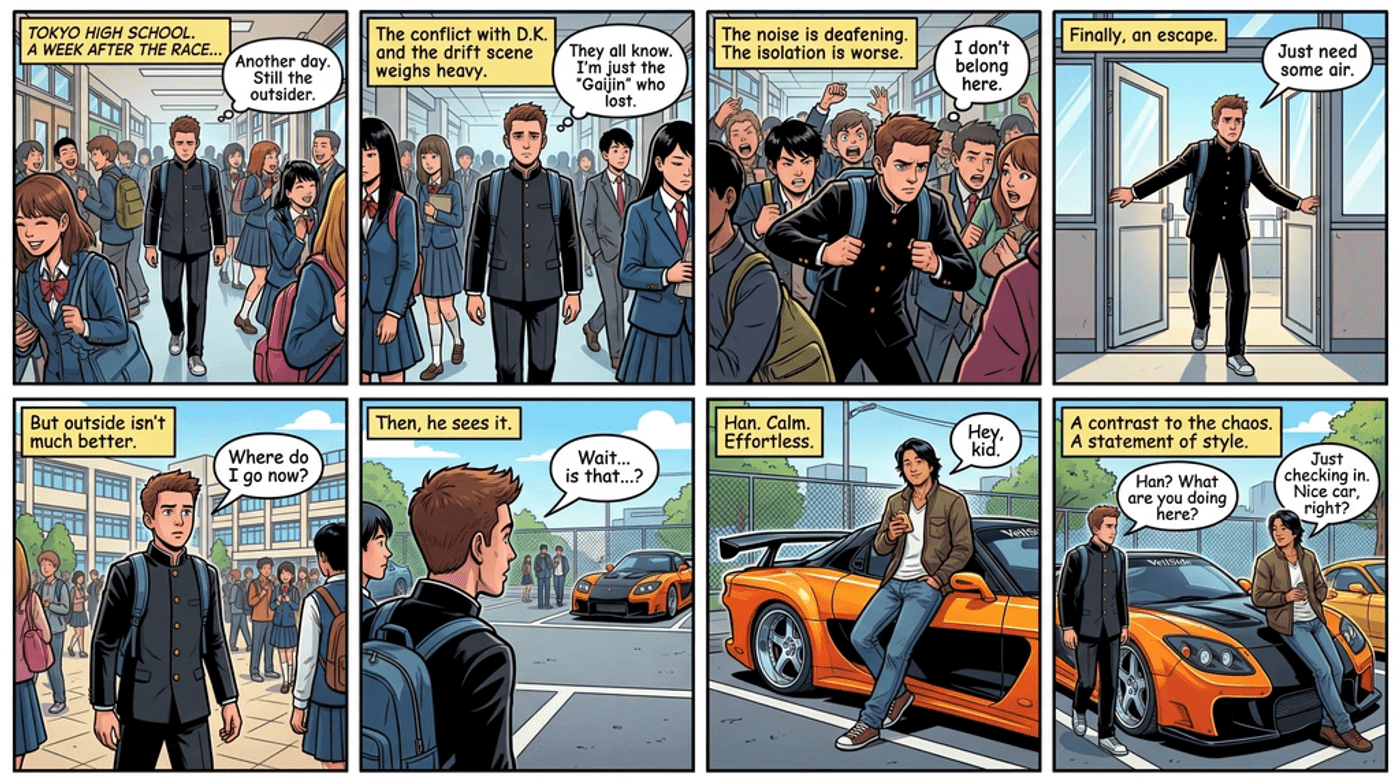
This Nano Banana 2 prompt shows how you can translate a known film scene into a structured 4×2 layout. Particularly effective for storyboarding.
Sean walks through a crowded Tokyo high school hallway , feeling alienated after conflict with the local drifting scene.
When he steps outside, he notices Han leaning casually against his orange and black VeilSide-bodykit Mazda RX-7 .
Han’s relaxed stance gives off a calm presence that contrasts with the noisy school atmosphere .
The slammed RX-7 with a large rear wing stands out as a bold symbol of style, precision, and drifting culture .
Best Practices and Common Pitfalls When Prompting on Nano Banana 2
To keep getting strong results from these and other nano banana 2 prompts, build a few simple habits.
Do:
-
Always include aspect ratio when it matters.
-
Front-load asset type and platform (16:9 storyboard, 4:5 infographic, 9:16 UGC)
-
Be explicit with on-image text and language
-
Use clear counts and constraints when you care about consistency across frames.
Don’t:
-
Rely on vague “make a cool image” requests
-
Mix conflicting instructions like “super minimal but also very busy” in one prompt
-
Overload scenes with too many elements and still expect perfect continuity.
-
Forget that most viewers are on mobile. Short copy and clean layouts beat dense detail.
Nano Banana 2 in Invideo for Seamless Prompting
You don’t need extra tools to use these Nano Banana AI prompts.
In invideo, open the AI Image Generator, choose nano banana 2 from the model dropdown, and paste any of the prompts from this guide.
Use them for architectural diagrams, infographics, cinematic shots, UGC frames, or comics, then drop the images straight into your timeline to add motion, music, voiceover, and exports for your channels.
Nano Banana 2 is not just another image-generating model in the market anymore. It’s a way to turn very specific ideas in your head into visuals you can actually use in production. Once you see how quickly you can get to “good enough to ship,” you’ll start building your own prompt variations and workflows that feel tailored to your brand and your way of creating.
FAQs
1. Which aspect ratios should I use with Nano Banana 2 for different platforms?
Match the framing to where the image will actually live. For YouTube thumbnails or landscape visuals inside a video, ask for “16:9.” For Instagram or Facebook feeds, “1:1 square” or “4:5 vertical” fills more of the screen without cropping. For TikTok, Reels, Shorts, and Stories, prompt for “9:16 full‑screen vertical.” Adding that line directly into your prompt (“4:5 vertical for Instagram feed,” “16:9 YouTube thumbnail”) helps Nano Banana 2 compose the scene correctly from the start.
2. What resolutions make sense when generating with Nano Banana 2?
For most social and on‑screen uses, you don’t need to chase ultra‑high resolutions. Starting with something in the 1024–1536px range on the long edge is usually enough, especially if you know the final aspect ratio. If you plan to crop, add overlays, or zoom slightly inside your editor, you can go a bit higher, but it’s better to generate a clean, correctly framed image first and rely on upscaling only when you truly need it.
3. How does Nano Banana 2 work alongside Seedream 4.5 and Grok Imagine?
Use Nano Banana 2 when you need fast, grounded, text‑sharp images for real campaigns: infographics, UI shots, product explainers, storyboards, and anything with legible labels or CTAs. Use Seedream 4.5 when you want more stylised, dreamy, or concept‑art‑like visuals where mood and style matter more than strict accuracy. Use Grok Imagine when you’re ready to turn those ideas into motion and build full video sequences or transitions from the frames you’ve designed.
4. What’s the best way to write prompts for sharp, readable on‑image text and CTAs?
Treat the text like you’re writing a brief. Spell out exactly what should appear in quotes, and describe its style and placement, for example: “bold white text that says ‘50% OFF’ in the top‑right corner on a dark overlay.” Keep copy short, avoid stacking too many different fonts in a single image, and mention contrast (“high‑contrast text against a dark background”) so the model doesn’t blend letters into the artwork. After generation, always zoom in and manually check spelling, numbers, and brand names before you ship.
5. How can I adapt these Nano Banana 2 prompts to fit my brand?
Start from the structures in this guide, but swap in your brand’s colors, tone, and visual references. Mention your palette (“using [brand color] as the primary accent”), your usual photography or illustration style (“clean, minimal, lots of white space,” or “bold, colorful, energetic”), and the type of people or environments that match your audience. Once you find a phrasing that consistently feels on‑brand, reuse that same wording across prompts so Nano Banana 2 learns your “house style” over time.
6. What should I do if Nano Banana 2 keeps getting a detail wrong?
When something important keeps slipping, like a logo position, a specific object, or a line of copy. You should simplify your prompt and push that detail to the front. Lead with one clear sentence about the must‑have element, then add style and atmosphere in a second sentence. If it still struggles, generate two or three variations with slightly different wording around that detail, pick the closest match, and refine from there; often a small change in phrasing (“centered headline text” instead of “big title”) is enough to lock the result in.
