Best Online Video Editors with Professional Timeline Controls
October 29, 2026

Invideo Editor is the best overall choice for precise browser timeline editing, combining independent motion curves, adjustable custom effects, selective grading and detailed audio mixing in one editable project. Manual editing, ordinary ChatGPT/Claude MCP editing and exports are free; built-in-agent work and generated media use credits, and your external assistant’s allowance is separate. Flixier is a strong alternative with easing, EQ and NLE exports. Kapwing offers collaborative editing and custom keyframes. Canva combines video editing with editable graphics and brand assets. ChatCut pairs timeline editing with AI assistance, while direct editing of individual graphic elements requires Desktop. Clipchamp offers accessible editing and free watermark-free 1080p delivery.
A browser edit can start with a few clips and become surprisingly demanding. A presenter needs to stay beneath a product close-up. The title should settle gently while the background keeps moving. One colour needs correcting without changing the rest of the shot, and the music needs to make room for the voice. You also need a project you can reopen when the next revision arrives.
We compared six online video editors for that work: invideo Editor, Flixier, Kapwing, Canva, ChatCut and Microsoft Clipchamp. The comparison follows building a layered edit, animating and refining effects, finishing picture and sound, and exporting or handing off. Here, professional control means specific adjustments you can make to the timeline, motion, image and mix.
Popular online video editors with timeline controls compared
Editor | Building the layered edit | Animating and refining effects | Finishing picture and sound | Exporting and handing off |
|---|---|---|---|---|
invideo Editor | A frame-accurate multitrack timeline keeps footage, titles and sound separately editable. Edit manually, use the built-in agent or direct ordinary edits through free ChatGPT/Claude MCP. | Independent property keyframes, Bézier curves and a graph editor shape movement. Layered constructions and agent-built custom effect controls let you refine the treatment after creating it. | Qualifiers and grade masks isolate corrections; wheels, curves and scopes refine them. Separate EQ, dynamics, automation and a bus mixer support a detailed soundtrack. | Free watermark-free video exports and editable timeline packages with media support delivery and continued editing in Premiere Pro, Final Cut Pro or DaVinci Resolve. |
Flixier | Edit multiple tracks with locks, groups and ripple edits. Premiere timelines can’t be imported directly; export the cut as a video or rebuild its layers. | Custom position, scale and opacity keyframes support layered animation. Easing changes how moves start and stop; effects, chroma key and adjustable styling develop the composition. | RGB gamma, blending and colour sliders refine the picture. Adjustable EQ bands, gain, pan and fades provide direct sound control alongside AI enhancement. | Export timelines with source media in several NLE formats. Linked Giphy, YouTube or Twitch assets block export, so remove them first. |
Kapwing | Kapwing’s Studio editor lets you work with video, text and audio layers in shared projects. Its AI assistant, Kai, can help with edits, while you can still adjust the timeline yourself. | Position, zoom and adjustment keyframes create custom motion. The separate AI Motion Graphics route returns an MP4, leaving its internal animation unavailable as individual editable elements. | Colour sliders, volume keyframes, fades and cleanup cover basic finishing. Warmth and tint can’t be keyframed, so a gradual white-balance correction needs a workaround. | Shared Studio projects support revisions. Watermark-free exports require payment; Free also caps videos at four minutes, so delivery requirements can force an upgrade. |
Canva | Editable video, graphic and audio tracks work alongside templates and brand assets. Core MCP editing is available across plans, with assistant-specific tool coverage. | Custom paths, Match & Move and adjustable native effects support graphic sequences. Created animations last at most ten seconds each, so longer motion needs another construction. | Colour adjustments, audio levels, fades and Beat Sync help balance picture and sound. Enhance Voice requires a paid plan and AI allowance, making repeated cleanup part of the access decision. | Shared Canva designs keep their elements editable. Own/free assets permit watermark-free delivery; premium assets need licensing before you can deliver a clean export. |
ChatCut | Separate video and audio tracks support targeted revisions. The AI agent can revise selected clips or passages, while multiple timelines let different versions share the same media. | Animation options include templates for titles, speaker labels and charts, graphics created by the AI agent, and zoom effects. Direct editing of individual graphic elements requires Desktop; browser users request those changes through the agent. | Separate sound tracks and automatic ducking help balance voice and music. Direct mask geometry editing is a Desktop workflow, adding an application for those hands-on refinements. | Compatible browser exports are free. XML reaches Premiere/Resolve, but unsupported graphics, captions, effects and transitions may be dropped, leaving finishing work to recreate. |
Microsoft Clipchamp | Separate tracks keep footage, titles and audio independently editable, with trimming, splitting, grouping and picture-in-picture layouts. Free personal projects lack cloud media backup, so originals must remain available for relinking. | Animated text, transitions and effects add fades, slides, spins and pulses, with controls varying by effect. Premium effects, filters and transitions require paid access, restricting the free selection. | Exposure, contrast, saturation, temperature and filter intensity control the picture. Audio levels, fades and noise suppression help balance sound; cleanup of video audio requires detaching it first. | Personal accounts include free watermark-free 1080p. Video exports are 30fps MP4; 4K requires eligible paid access. Editable projects cannot be shared through OneDrive/SharePoint, limiting that route for handing off an edit. |
1. invideo Editor: Best overall for precise browser timeline editing

Authentic invideo Editor control view from a separate project: transform settings beside independent property curves.
Invideo Editor’s frame-accurate multitrack editing suite combines layered assembly, animation, effects, colour and sound in one browser project. The built-in editing agent, ChatGPT or Claude connected through MCP, and manual timeline controls all work on that same project. You can keep revising through chat, refine individual settings by hand and export the finished video or an editable project.
Separate tracks keep footage, overlays, titles, music and sound effects independently editable. The agent can assemble and revise the sequence, while manual controls provide frame-level adjustments to cuts and individual layers. Connected ChatGPT or Claude assistants can make the same kinds of changes. Revisions stay within the existing timeline, supporting changes to one layer or section while retaining the rest of the edit.
The keyframe controls give position, scale, rotation and opacity independent timing and Bézier curves. Each property’s speed, acceleration and settling can be adjusted separately. The graph editor shows those curves for manual refinement, and supported effect or mask properties can be animated too. ChatGPT or Claude can help revise the animation on the same timeline.
Custom treatments can combine editable layers and effects, while the agent can construct an effect from a description or reference with adjustable controls. In Luuk Alleman’s invideo-partner demonstration around 03:50, a custom light-trail panel exposes threshold, softness, trail length, direction and mix beside the editable timeline. Those settings let an editor refine that particular effect without rebuilding the surrounding sequence.
Picture and sound finishing stay in the same workspace. Hue, saturation and luminance qualifiers and grade masks restrict corrections to selected colour ranges or areas, while wheels, curves and scopes provide fine adjustments. In the audio workspace, parametric EQ, de-essing and compression support voice processing; automation, buses and sends control levels and routing across dialogue, music and effects. ChatGPT or Claude can apply and revise those adjustments, with the same controls available for manual refinement.
Targeted revision requests can change selected layers or time ranges while preserving approved material. The client-feedback guide explains how to identify the target, desired change and approved material to retain.
Manual editing, ordinary ChatGPT or Claude MCP editing, watermark-free videos and editable-project exports are free. Your external assistant’s subscription and allowance apply separately. Built-in-agent work and new image, video or audio generation use invideo credits.
Invideo is the strongest overall choice because precise motion, adjustable custom effects, selective grading and detailed mixing belong to one editable workflow, with agent assistance available across it. You can finish there or export the timeline and media for continued work in Premiere Pro, Final Cut Pro or DaVinci Resolve.
2. Flixier: For layered browser edits with easing, EQ and NLE delivery

Flixier’s official product walkthrough at 00:24: the browser workspace, timeline and project settings. The footage is the vendor’s demonstration.
Flixier is a credible option when you want to arrange several layers and refine them directly in the browser. Its timeline supports track locks, groups, snapping and ripple changes, while selected ranges can become a new project or a separate export. These controls keep visual and audio layers organized during revisions.
Its animation goes beyond preset entrances. Custom keyframes change position, scale and opacity, and easing controls how a move starts or ends. You can retime the keyframe points and adjust the composition at each one. Chroma key, blur, shadows, strokes and blend settings also support layered treatments.
Flixier deserves credit for its finishing controls. Colour sliders, separate RGB gamma and blend modes help develop a look. Audio offers gain, pan, fades and individually adjustable EQ frequency bands, so voice treatment is not limited to choosing an enhancement preset. Eva, its built-in assistant, can help with transcript-led assembly, timeline changes, captions and sound; editing with Eva requires Creator or Business; Free and Starter provide help only.
The transfer direction matters. Flixier exports several timeline formats, including Premiere, Resolve, Final Cut Pro 7, EDL and AAF, with source media. However, linked Giphy, YouTube and Twitch media block timeline export. Premiere timelines cannot be imported directly as XML or EDL, so an existing cut must be supplied as a rendered video or rebuilt from its media. It therefore suits starting a project online more readily than moving an existing layered Premiere cut into the browser.
Free output is watermarked at 720p with ten export minutes per month. The starter plan removes the watermark and provides 1080p with 60 minutes, and the creator plan adds 4K and unlimited video exports.
AI generation and transcription use credits, so their allowance is separate from unlimited video exports. The plan guide lists monthly US prices of $19 for Starter and $39 for Creator; regional and annual offers differ. Flixier suits substantial browser editing and a planned outbound handoff, with its source-media restrictions checked early.
3. Kapwing: For collaborative layered videos with custom keyframes

Authentic Kapwing Studio research capture: a title and video layer beside position and zoom controls.
Kapwing combines a layered Studio editor with shared workspaces and Kai, its native AI assistant. You can arrange footage, text and audio directly, then use the assistant for broader project changes. This is useful for a team producing explainers or branded social videos where several people need to continue the same project.
Custom position and zoom keyframes let you move and enlarge a shot or graphic over time. Adjustment keyframes can change opacity, brightness, contrast, saturation and blur. Combining those properties across separate layers gives you real custom animation, beyond choosing a preset entrance. Whole-shot picture adjustments, volume keyframes, fades and automated cleanup support the finishing pass. Warmth and tint cannot be keyframed, so a gradual white-balance correction needs a workaround.
Kapwing can also create animated graphics through its separate AI Motion Graphics tool, which delivers an MP4 with the animation baked in. The video can be trimmed and layered in Studio, but changing individual graphic elements requires revising or regenerating the asset. This limitation applies to that generated output, not all Studio layers or edits made through Kai.
Free exports are watermarked, limited to 720p and at most four minutes. Pro removes the watermark and adds up to 4K output and two-hour exports, while AI work remains subject to plan and credit allowances. The current annual price is US$16 per member per month, billed yearly. Those free export limits matter for a clean client master. Kapwing suits collaborative assembly, custom keyed moves and straightforward finishing; the creative-control comparison explores the finer finishing decisions.
4. Canva: For design-led videos with editable graphics and custom motion paths

Authentic Canva research project: custom animation controls beside separate title, video and audio elements. A sparse control study, not a finished production.
Canva is useful when the video belongs to a wider design system. Templates, brand assets, typography and editable graphics sit alongside a multitrack video timeline. You can trim and split footage, time overlays and arrange separate music or voice tracks without moving the design into another application. Core MCP editing transactions are available on all plans, although the tools exposed by each assistant can differ.
Custom animation records a path as you drag an element, with movement styles and speed controls. Match & Move connects changed element states across pages. Native effects and shader animations offer adjustable treatments, including Shake Zoom intensity or Whip Slide speed. The shader options are subject to eligible-plan and rollout access. These are genuine editable options, distinct from a generated video asset.
However, a created animation is limited to ten seconds, with fifty created animations per design; these are animation limits, not a ten-second limit on the whole video. Complex coordinated movement may require several paths or page states. Invideo’s property-level curves provide a more direct route for independent timing across position, scale and opacity.
Colour adjustments, audio levels, fades and Beat Sync help balance picture and sound. Enhance Voice offers an adjustable overall treatment, but requires Pro, Business or Enterprise and uses the monthly AI allowance. That is a different workflow from tuning separate EQ and dynamics processors during a detailed mix.
Free editing and watermark-free exports can cover projects using your own or free assets. Premium content needs the appropriate licence. Automatic Beat Sync requires Pro; free users can still snap clips to beat markers manually. Canva suits graphic-rich videos that need to remain editable within a shared brand-design workflow. The Canva control comparison develops the motion, grading and audio distinctions.
5. ChatCut: For selection-led agent requests with direct timeline editing

Official ChatCut documentation detail: separate video/audio tracks and track-header controls.
ChatCut offers timeline and transcript controls for direct editing, alongside an AI assistant for requested changes. Clip, transcript and time-range references keep a request focused on the selected material. Multiple timelines share a media pool, while locks, trims, splits and separate video/audio tracks support direct revisions between agent passes.
Its visual tools include reusable motion graphics, titles and charts created by the AI assistant, effects, six browser zoom presets and face tracking. Separate audio tracks support independent sound adjustments, and automatic ducking lowers music beneath dialogue.
However, direct editing of individual graphic elements requires ChatCut Desktop 0.3.13 or later, while direct mask geometry editing is also a Desktop workflow. In the browser, the assistant handles changes to graphic structure, animation and individual elements. Hands-on refinement of those elements or masks therefore adds a Desktop step.
Delivery needs planning too. ChatCut’s XML reaches Premiere Pro or Resolve, but captions, unrendered motion graphics, effects and transitions can be dropped. Including motion graphics in that handoff requires Pro, which renders them as transparent ProRes files. They remain rendered assets rather than the original individual editable graphic elements.
Manual editing and compatible browser-local exports are free; exports themselves do not spend ChatCut credits. Manual web export automatically chooses a browser or cloud route based on compatibility. Free cloud rendering has a cumulative 60-minute allowance. Cloud video is limited to 1080p; 4K requires compatible browser rendering or Desktop local export.
Built-in-agent requests and hosted generation use credits. Pro removes the cloud-duration quota. Public pricing currently lists 100 monthly credits at US$25 on monthly billing; the account’s Upgrade panel controls its offer. ChatCut suits focused agent direction and direct timeline work, with Desktop and the handoff’s rebuild requirements included in the plan.
6. Microsoft Clipchamp: For accessible layered edits and free 1080p delivery
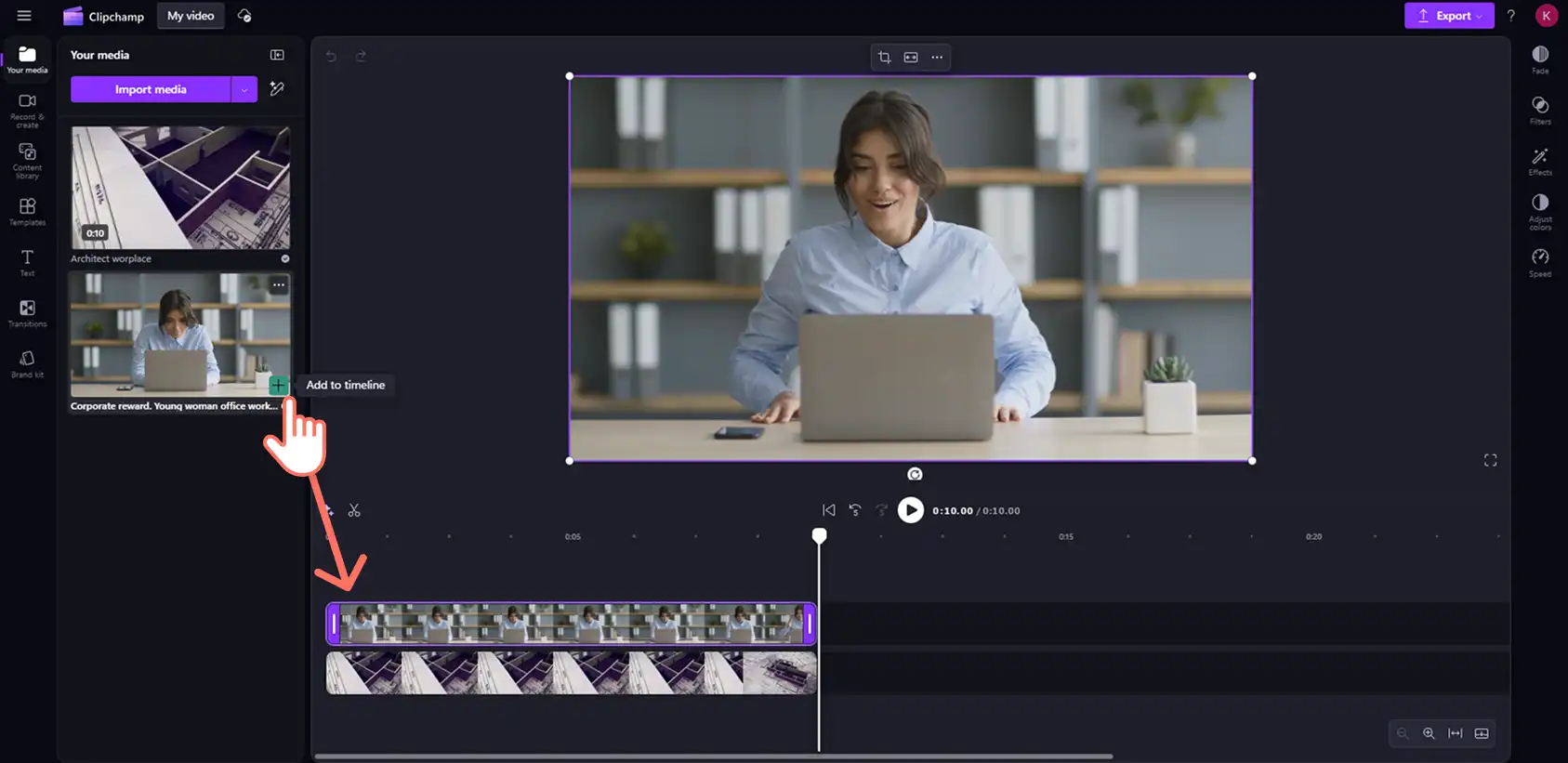
Official Clipchamp personal-account tutorial: two video layers on the timeline. The instructional arrow is part of Microsoft’s source image.
Clipchamp is an accessible browser option for a clear sequence with a few visual and audio layers. You can stack videos, create picture-in-picture layouts, trim boundaries and add text, music and captions. Timeline zoom and the playhead help you work at the relevant moment instead of treating the video as a set of fixed slides.
Its filters are adjustable through intensity settings, and the colour panel offers exposure, contrast, saturation, temperature, transparency and blend modes. Animated text, transitions and supplied effects add movement, but premium effects, filters and transitions require paid access. Levels, fades and noise suppression cover common audio needs; video audio must be detached before noise suppression. These controls suit a straightforward picture and sound finishing pass.
Source handling and collaboration have limits in personal accounts. Free projects lack cloud media backup, so original files need to remain available for relinking. Microsoft also lists editable-project sharing through OneDrive/SharePoint as unavailable in personal plans. That limits that route for another editor to continue the cut.
Personal accounts include free watermark-free output up to 1080p. Finished videos export as 30fps MP4 files, which limits delivery when another frame rate or container is required. 4K requires eligible paid access; Microsoft 365 work/school entitlements differ. Clipchamp projects remain available for later Clipchamp revisions. It suits accessible layered editing and free HD delivery when those output and handoff limits fit the job.
Frequently asked questions
Does having keyframes mean an editor has a graph editor?
No. Keyframes set values at moments in time; interpolation determines how values change between them. A preset easing choice can smooth a movement. An editable Bézier graph gives you finer control over its acceleration and settling. Check the actual property and curve controls your animation needs.
Can I continue an existing Premiere or Resolve project in a browser?
Depends on the editor. Invideo supports compatible XML project imports with source media. Flixier’s current Premiere guidance requires a rendered video or manual reconstruction. A browser editor advertising NLE export does not automatically support importing that NLE’s editable project.
Will an editable-project export preserve every effect and graphic?
Do not assume it will. The destination format and supported treatments matter. Invideo packages timeline and media, Flixier lists several interchange formats, and ChatCut explicitly warns that some elements can be dropped. Open the handoff in the destination application and check the layers, media, graphics, grade and sound before relying on it for finishing.
Can I finish and export without buying an editing subscription?
Yes. Invideo includes manual editing, ordinary ChatGPT/Claude MCP editing and watermark-free exports for free. Your assistant’s allowance is separate; invideo built-in-agent work and generation use credits. Clipchamp’s personal Free plan delivers watermark-free 1080p. Canva can export cleanly with own/free assets, and ChatCut supports free compatible local exports. Their premium content, AI and delivery limits still apply.
Will any browser editor accept my camera’s original files?
Check the exact codec, container, resolution and frame rate, rather than relying on a file extension alone. Browser and device support also affect local playback and export. Try representative footage before committing the project, and retain originals for any later relink or NLE handoff.