Why do you still need human editing skills when using AI video generators?
Last updated July 14, 2026
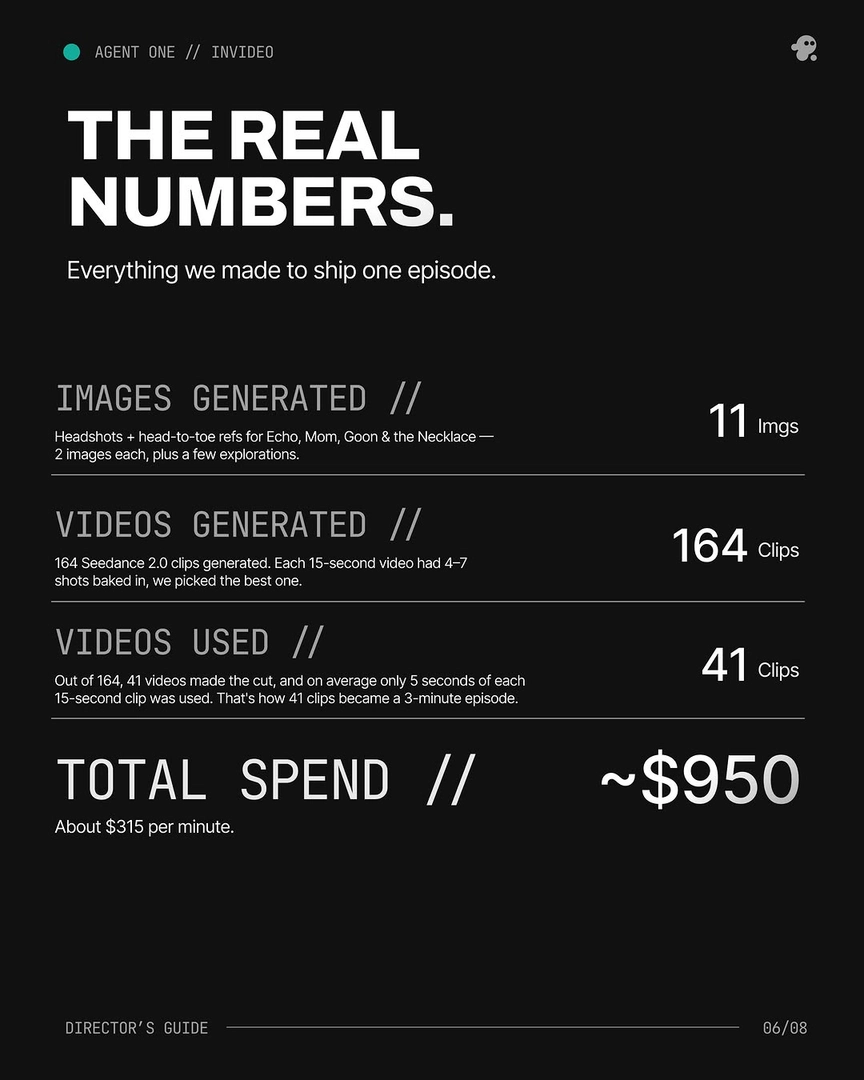
AI video generators produce raw clips, not finished films — human editing turns one into the other. In one documented production, only 41 of 164 generated clips made the final cut, with an average of 5 usable seconds kept per 15-second clip. Selection, stitching, pacing, color, and sound remain human editorial decisions.
Human editing skills matter because every stage between raw generation and finished film is a judgment call the model can't make for you. Here's where those skills do the work:
Editorial selection — deciding what's usable. Expect roughly 3 generations per usable shot, and each long clip typically contains 4–7 shot candidates rather than one. In one 3-minute animated episode, 164 clips were generated, 41 made the cut (~25%), and on average only 5 seconds of each 15-second clip survived. The model produces options; a human with editorial taste chooses which seconds carry the story.
Frankenstein shot assembly — stitching the best seconds from multiple generations into one shot. In that same episode, 17 of the final shots — more than 40% — were composited from 2 or more generations. That's cut-point selection, match-on-action judgment, and rhythm: pure editing craft applied to AI footage.
Hiding the seams. When you stitch generations, you decide where the eye goes at the moment of the cut: use camera motion and subject motion to carry the join, and place a strong point of focus away from the frame's most visible imperfection. One creator built a 1.5-minute continuous-looking shot this way — the cuts exist, but viewers don't see them. A still frame sitting between two motion segments is the worst case for a hidden cut, and only an editor catches that on the timeline.
Pacing and structure. Whether footage becomes a coherent film is decided in the edit, not in generation. One creator scripted a 60-second short and cut it shorter because the pacing worked better — a call no generator makes on its own. Across content businesses, editing is estimated at roughly 95% of total production time, which is why it stays the bottleneck AI hasn't removed.
Correcting the AI look. Generated footage tends to come back ultra-sharp with a plasticky skin quality. The fix is post work: a touch of blur, grain, and a grade pushed toward live-action film. Between stitched clips, even a 1% color variance is visible at rest — a slight RGB curve lift and a small hue shift close the gap. An upscale pass can be automated (you can spin up an upscaler sub-agent inside invideo), but the grading decisions stay yours.
Sound and voice continuity. Replace video-model-generated voices with dedicated voice AI and resync them in your editor to hold voice continuity across episodes, and supplement native SFX where the model's audio falls short. Splitting dialogue into single-line clips during generation gives you more control at this stage — an editor's instinct applied upstream.
Where AI helps the edit without replacing it. invideo is an agentic video creation tool, and the invideo agent works as a production asset generator — final assembly still happens in your NLE. But it can review your work: upload a rough cut and it returns pacing, SFX, and continuity feedback — in one production it caught an emotional register error in a reveal shot the director had missed, and in another it flagged prop and color-grade inconsistencies automatically. The documented principle is EDITOR + AGENT = QUALITY: the combination beats either alone, which is exactly why the human half of that equation keeps its value.
Watch some of these to see what works for you:
As AI gets better, you start to realize adding it into your workflow is mandatory, but you still need editing skills to keep that high budget feeling and to separate yourself from the AI slop channels.
— a video creator documenting an AI-augmented production workflow